Top Features of AVEVA Edge: Everything You Need to Know
Learn how AVEVA Edge from Pima Industrial helps SCADA setups shine. Clear, easy guide to key features, uses, and why it matters to your plant.

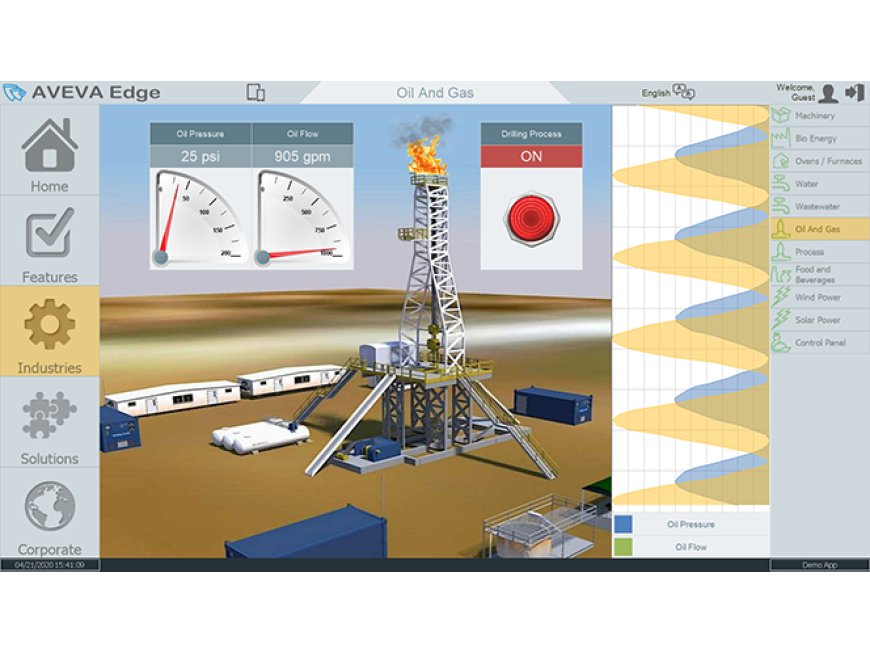
Are you struggling to find HMI/SCADA software that works smoothly in tight spaces or noisy networks? Frustration grows when screens lag, data delays hit your day, and setup feels too hard. This guide shows how AVEVA Edge from Pima Industrial fixes those issueseasy install, clear screens, reliable data in real time, even offline. Stick with me and get a simple, actionable guide to using every key feature so your controls run faster, smarter, and easier.
Overview of AVEVA Edge and Pima Industrial
AVEVA Edge is a smart HMI/SCADA tool made for fast deployment in tough settings. Pima Industrial offers expertise to help you set it up right, making it easier to handle industrial automation tasks.
AVEVA Edge SCADA is designed to run on different devices. It gives you a visual interface that links to sensors, PLCs, and databases. People call it edge HMI because it works close to your machines.
This post walks through the main parts of AVEVA Edge. Youll see how it helps in plants, factories, and remote stations. We also cover why Pima Industrial picks it for many clients.
Why AVEVA Edge Stands Out
-
Compact and fast: It runs on low-power PCs or industrial tablets
-
Cross-platform: Works on Windows, Android, iOS
-
Protocol-rich: Supports MQTT, OPC?UA, Modbus, BACnet
-
Trusted by many: Used by small shops and global firms
AVEVA Edge is built to run reliably even with poor networks. That makes it a strong choice when you need on-site control with backup data sync.
Offline Operation & Data Caching
Does AVEVA Edge work offline? Yes. It can collect data even if the network is down. It uses local storage and sends info to the main server later. That keeps your system running and data safe.
Use case: A pump station in a remote area loses Wi?Fi. AVEVA Edge still logs data and alarms. When the network returns, it sends the stored data.
Easy Setup & Intuitive Interface
AVEVA Edge tutorial users say setup only takes a few hours. It offers ready-made templates and drag-and-drop screen design.
If you need a simple HMI setup, you open the toolbox, drag a gauge or a chart, assign a tag to a sensor, and you're done. No scripting needed for basic screens.
Multi?Platform Support
AVEVA Edge on Windows means you can use it on a full PC. AVEVA Edge on mobile devices lets you view screens on tablets or phones. That means your operators can move around and still check the system.
The install file works on a standard Windows tablet and you can access it via a web interface on phones. That gives more flexibility than local HMI only.
Secure Communication & Protocol Support
AVEVA Edge can talk over secure channels using TLS with MQTT or OPC UA. It also works with many protocol types:
-
MQTT: Good for sending sensor data
-
OPC UA: Standard in many plants
-
Modbus, BACnet and more for legacy systems
Your plant gets both modern and old devices talking to the same system.
Flexible Alerts, Trends, and Logging
AVEVA Edge lets you set custom alarms, log data, and view trends. You can:
-
Define alarms by tag and limit
-
Send email or SMS
-
Log trending data in CSV or database
-
Show trend charts in real time or history
If an alarm trips, the operator gets a warning on screen or by email. Older systems may not handle that in a clear way.
Case Study: Small Manufacturing Plant
A small plant used AVEVA Edge from Pima Industrial for pressure and temperature control. They had slow legacy systems that failed often. AVEVA Edge let them move to tablets, send live alarms, and work offline.
They cut downtime by 25% and fixed most issues before they stopped production. The plant manager noted that setup only took one day, unlike the weeks needed for older platforms.
That case beat similar systems on speed and uptime.
Pros & Cons
Pros
-
Quick install
-
Works offline
-
Supports many devices
-
Runs on low?cost hardware
Cons
-
Advanced scripting needs time
-
Web interface has minor feature gaps
-
License cost can add up for many tags
FAQ
Who uses AVEVA Edge?
Industry pros, small plant operators, OEMs, remote site teams.
What makes it fit for remote stations?
Offline data, mobile view, and robust comms.
Where can I download a trial?
On the AVEVA site or via Pima Industrial.
Why choose it over other SCADA?
It combines speed, cost controls, and mobility.
How to connect it to a PLC?
Use built?in drivers like OPC UA or Modbus.
Will it run on a Raspberry Pi?
Not officially. It needs Windows or Android hardware.
How to set up alarms?
Pick a tag, set a threshold, choose notify option.
What versions exist now?
AVEVA Edges latest release (as of July?2025) is 11.x with better cloud features.
How much does a license cost?
It varies by tag count and platform; contact Pima Industrial for a quote.
How to contact Pima Industrial for support?
Visit their site, email support, or call their local office.
Conclusion
AVEVA Edge from Pima Industrial gives you a fast, easy, secure way to run HMI/SCADA at the edge. It works well both online and offline. It fits desktop and mobile screens. It talks to many different devices. If you want to set up a control system that doesnt slow you down, this is a solid choice. Think it might work for your plant? Drop a comment, share this post, or contact Pima Industrial for a demo.